Smart Brush: A Script Font That Elevates Digital Branding
Recently, I was working on a boutique online store’s homepage redesign. The client wanted something that felt personal, authentic, and modern—something that would stand out in a crowded market. After experimenting with several fonts, I came across Smart Brush, a script handwritten font that immediately caught my eye.
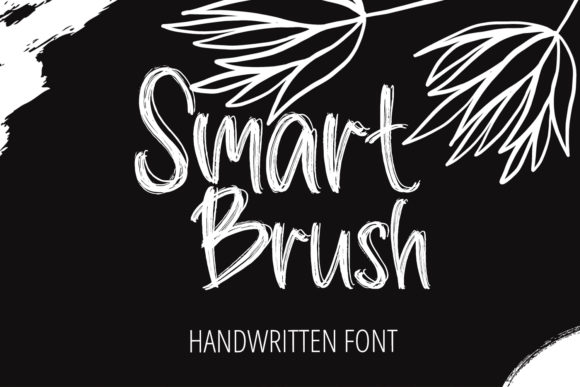
Smart Brush is more than just a decorative font—it's a versatile typeface that brings personality to digital content without sacrificing readability. Its unique, handwritten style gives it a warm, approachable feel, making it ideal for creative brands or businesses that want to convey a sense of authenticity.
Aesthetic and Personality
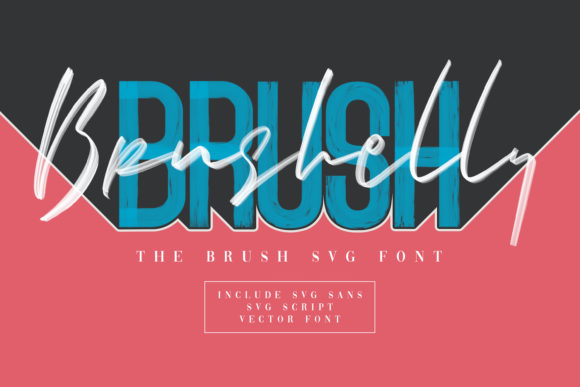
What sets Smart Brush apart is its natural flow and subtle variation in letterforms. Each character feels handcrafted, with slight irregularities that add character and charm. It’s not overly stylized, which makes it more accessible for web use. The font has a friendly yet professional tone, striking a balance between casual and polished.
Visually, Smart Brush works well with both light and dark backgrounds. On a white background, it feels clean and modern, while on darker tones, it adds contrast and visual interest. This flexibility makes it suitable for a wide range of design applications, from hero sections to call-to-action buttons.
Real-World Application
In the case of the boutique store, I used Smart Brush for the hero section headline and logo text. The result was a strong visual identity that communicated the brand’s personality effectively. The font’s legibility on mobile devices was also impressive, which is crucial for ensuring a seamless user experience across all screen sizes.
I paired Smart Brush with a simple sans serif font for body copy, creating a clear hierarchy and improving readability. This combination allowed the design to maintain a cohesive look while keeping the content easy to scan and read.
Another project where Smart Brush shone was a course sales page. The font added a touch of elegance to the title and key selling points, making the content feel more engaging and trustworthy. It worked especially well over image banners, where its organic style complemented the visual elements without overpowering them.
Readability and Usability
When testing Smart Brush on smaller screens, I noticed that it performed exceptionally well. Even at smaller sizes, the characters remained distinct and legible. This is important for responsive layouts, where the font must adapt to various screen sizes without losing clarity.
For buttons and short phrases, Smart Brush is an excellent choice. Its bold, expressive strokes make it stand out, which can help draw attention to key actions like "Shop Now" or "Enroll Today." However, I recommend using it sparingly to avoid overwhelming users with too much decorative typography.
On dark backgrounds, Smart Brush can sometimes appear slightly less readable, so it’s best to test it in different contexts. Adding subtle shadows or outlines can enhance legibility without compromising the font’s aesthetic appeal.
Font Pairing and Design Strategy
Pairing Smart Brush with a complementary font is key to achieving a balanced design. For a modern, editorial-style layout, pairing it with a clean sans serif like Montserrat or Lato creates a strong contrast that highlights the personality of Smart Brush.
If you're aiming for a more classic look, consider pairing Smart Brush with a serif font like Playfair Display. This combination can give your design a refined, sophisticated feel, perfect for branding or packaging design projects.
It’s also worth noting that Smart Brush includes multiple weights and alternates, which adds versatility to your design toolkit. Whether you need a bold headline or a delicate subtitle, the font offers options that suit different design needs.
Technical Considerations
Before implementing any new font, it’s important to check its technical specifications. Smart Brush includes webfont support, which means it can be easily integrated into websites without affecting performance. It also supports multiple languages, making it a great choice for international projects.
Ensure that the font’s licensing terms align with your project’s requirements. If you’re using it for a commercial website or landing page, confirm that it allows for web use and that you have the necessary permissions to use it across different platforms.
Additionally, consider how the font integrates with other design assets. Smart Brush works well with social media graphics, blog headers, and digital ads, making it a valuable addition to any designer’s toolkit.
Conclusion
Smart Brush is a powerful tool for designers looking to elevate their digital projects with a touch of personality and style. Whether you're building a portfolio site, a course sales page, or a branded landing page, this font offers the right balance of aesthetics and functionality.
By understanding its strengths and limitations, you can use Smart Brush to create engaging, visually appealing designs that resonate with your audience. When used thoughtfully, it can become a key element of your brand’s visual identity, helping you stand out in a competitive digital landscape.